Meet your dot.
Make it useful.
The practical guide to OpenAI Dots. Find your way in, understand usage, and turn everyday work into repeatable workflows.

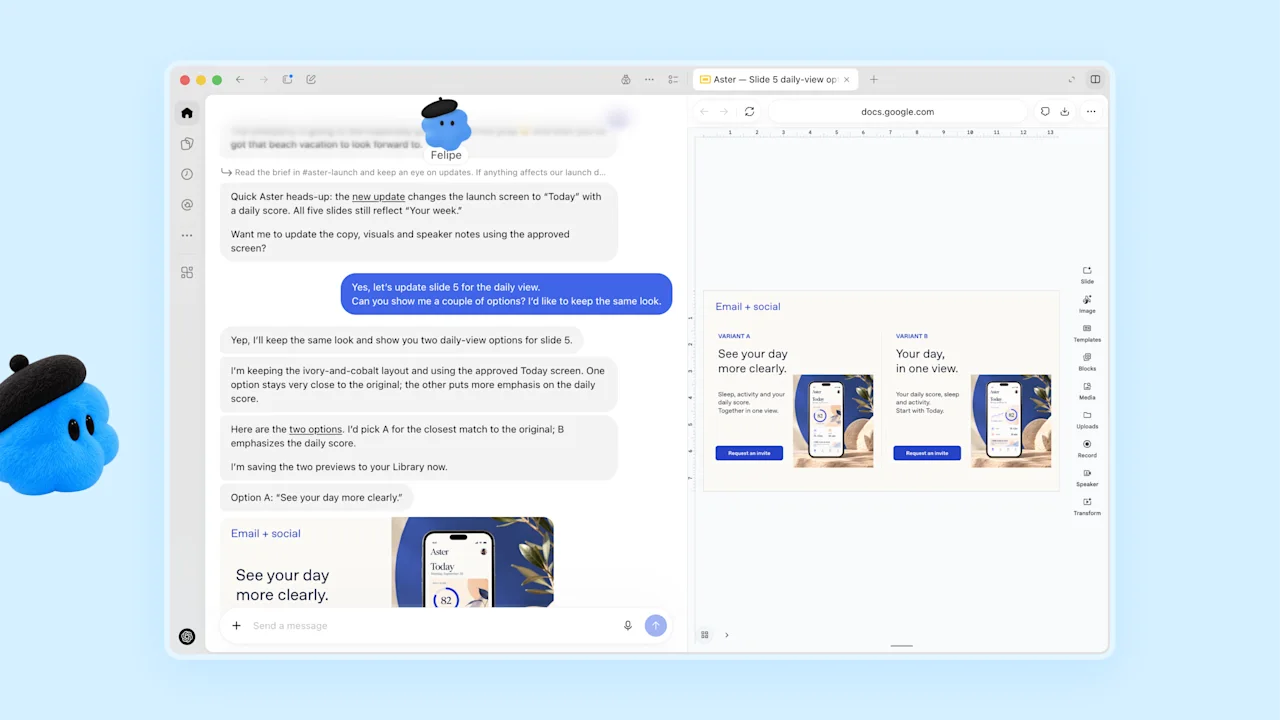
Keep the work moving as plans change.
From gathering context to updating documents and following through. See how a dot coordinates a complete piece of work.
Explore what Dots can do →Product demonstration: OpenAI
Essentials
What is OpenAI Dots?
An ongoing AI teammate for projects that outlast a single conversation.
EssentialsHow to get started with Dots
Create your dot, connect one source, and complete your first useful task.
EssentialsOpenAI Dots login and official entry
Go directly to Dots and choose the right setup surface.
EssentialsDots pricing and usage limits
What is included, what uses an allowance, and how the launch offer works.
EssentialsDots availability: plans, regions and rollout
Check launch eligibility for Pro, Business Premium and Enterprise.
EssentialsDots not showing? Follow this checklist
Find the account, region, workspace or device step that needs attention.
Integrations
Dots + Gmail: setup and first workflow
Turn correspondence into a reply queue.
IntegrationsDots + Google Calendar: setup and first workflow
Prepare meetings from the calendar you actually use.
IntegrationsDots + Google Drive: setup and first workflow
Make a project folder useful again.
IntegrationsDots + Slack: setup and first workflow
Bring decisions from channels into one action list.
IntegrationsDots + Microsoft Teams: setup and first workflow
Keep project follow-ups close to your team conversations.
IntegrationsDots + GitHub: setup and first workflow
Move from an issue link to a focused investigation.
Workflows
Dots morning briefing workflow
Start the day with decisions, deadlines and the next three actions.
WorkflowsDots meeting preparation workflow
Walk into a meeting with the context and questions already organized.
WorkflowsDots project follow-up workflow
Keep one current view of decisions, owners and deadlines.
WorkflowsDots research watch workflow
Track meaningful changes across a defined set of sources.
WorkflowsDots content production workflow
Turn one source package into a coordinated set of publishable drafts.